Image Optimizer
Disclaimer: If you are unsure whether your downloaded image is truly progressive JPEG or interlaced PNG, you can verify or convert it using this online tool .
Web Performance Guide
Progressive JPEG vs Interlaced PNG Explained
How image rendering formats determine what users see while files are loading over the network.
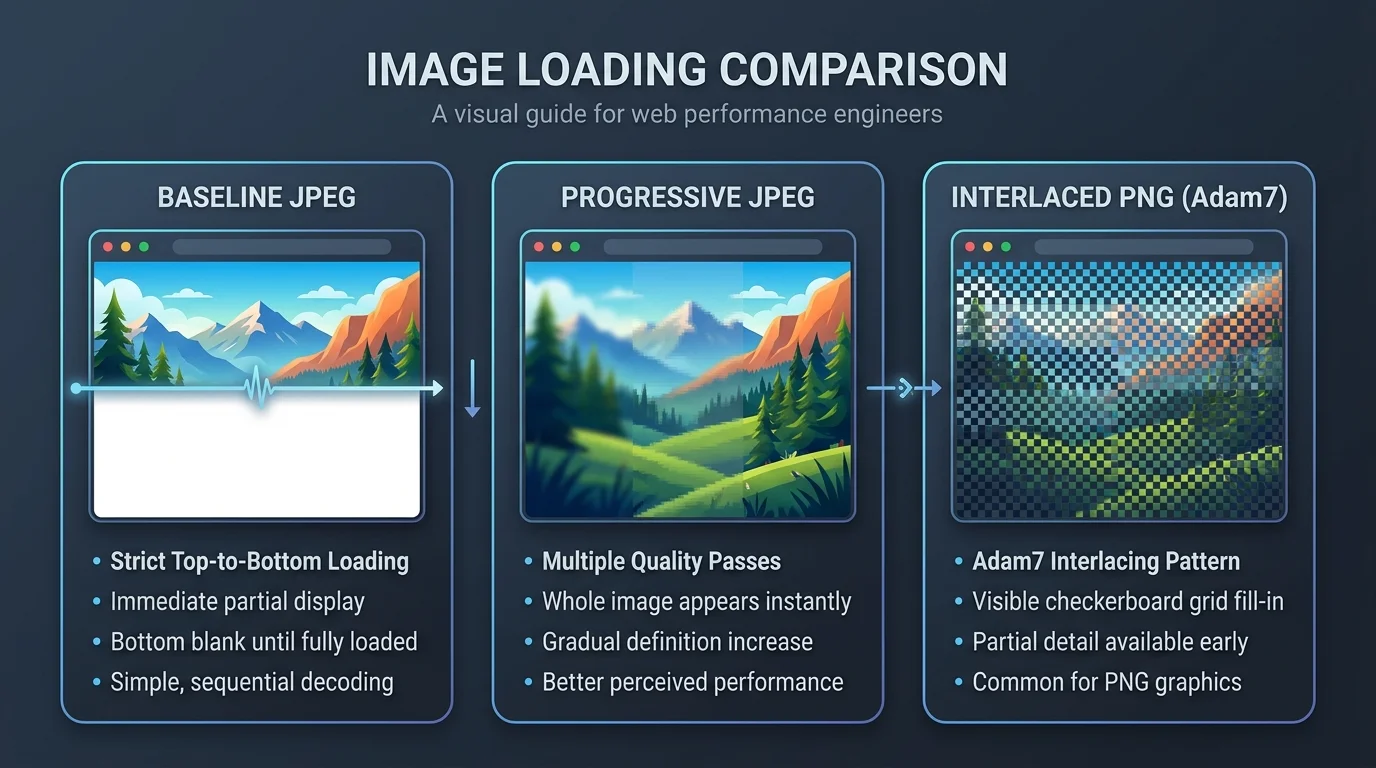
Visual comparison: Baseline JPEG (sequential top-to-bottom), Progressive JPEG (multi-pass resolution refinement), and Interlaced PNG (Adam7 2D grid).
Baseline JPEG
Sequential Scan (Default)
- How it loads: Strictly from top to bottom, row by row.
- User experience: The user sees the top portion clearly while the lower half stays completely blank until the entire file finishes downloading.
- Drawback: On slow mobile networks, users often assume the page is broken or stuck.
- Best for: Tiny icons or small thumbnails (< 10 KB) where loading is practically instant.
Progressive JPEG
Multi-Pass Spectral Refinement
- How it loads: In multiple passes over the whole image frame. First pass displays a low-resolution or blurry preview, then successive passes increase sharpness and fine detail.
- User experience: Users instantly recognize the full subject and layout, drastically improving perceived speed and reducing bounce rates.
- Bonus efficiency: Typically 2% to 10% smaller in file size than baseline JPEGs because frequency coefficients compress more efficiently.
- Best for: Large banners, photography, hero images, and blog post graphics.
Interlaced PNG
Adam7 2D Grid Interlacing
- How it loads: Uses the Adam7 algorithm with 7 distinct passes across an 8×8 pixel grid pattern, creating a recognizable pixelated/checkerboard preview early on.
- User experience: Full image dimensions and silhouette appear early, giving instant visual feedback.
- Important trade-off: Interlacing increases file size by 10% to 30% because it breaks PNG's horizontal scanline compression filters.
- Best for: Low-bandwidth scenarios needing lossless graphics with transparency previews (though modern WebP/AVIF are usually preferred today).
| Feature | Baseline JPEG | Progressive JPEG | Interlaced PNG (Adam7) |
|---|---|---|---|
| Loading Motion | Top to bottom (blind-like) | Blurry full frame → Sharp | Checkerboard grid → Sharp |
| Perceived Speed | Slow on sluggish networks | Fastest (instant preview) | Fast (early outline preview) |
| File Size Impact | Standard baseline | Often 2%–10% smaller | 10%–30% larger than normal PNG |
| Best Use Case | Thumbnails, small assets | Hero banners, blog photos | Lossless icons with transparency |