Disclaimer: All tools plugin here never store your information and are fully open source to help your needs.
Prompt Generator
Upload a template file or paste your template below
How to use
- Go to your preferred AI platform.
- Paste your sample prompt.
- Add a directive like:
"convert to enable adjust this prompt with [variables] add origin sample [aspect-ration+ add sample origin prompt]" - Copy and paste from AI platform into text-area above
Create a new pose for the [mascot_name] in a friendly, dynamic stance. This version should show the mascot standing [pose_description], exuding a sense of [emotion/feeling]. The design should maintain the mascot's signature [primary_color] color with [additional_elements] on its [body_part]. The overall look should be [style/attitude], with a slightly tilted head to give it an [adjective] vibe. - After Generated copy and paste into your AI platform:
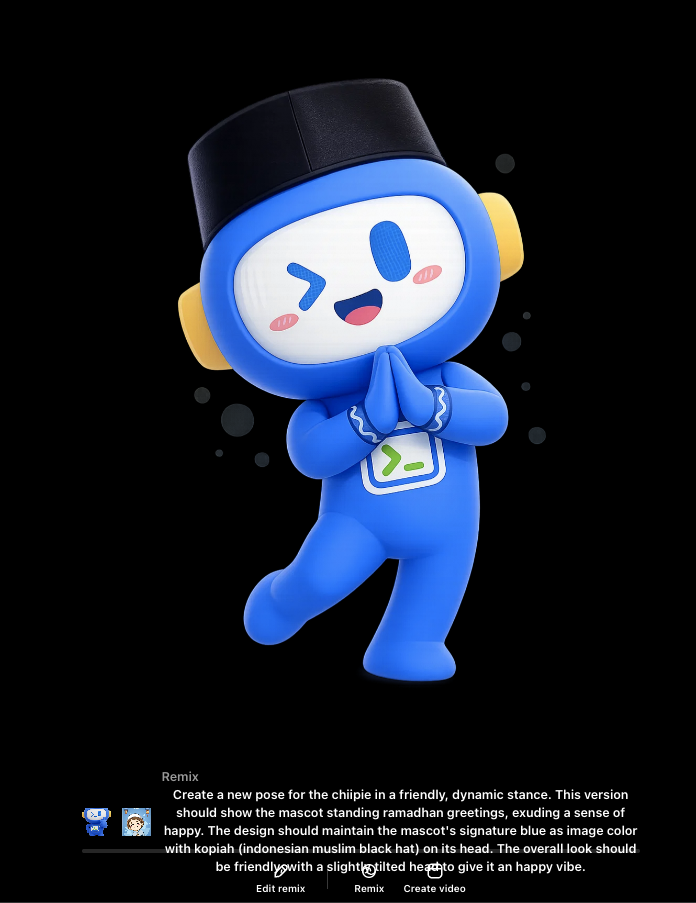
Create a new pose for the chiipie in a friendly, dynamic stance. This version should show the mascot standing ramadhan greetings, exuding a sense of happy. The design should maintain the mascot's signature blue as image color with kopiah (indonesian muslim hat) on its head. The overall look should be friendly, with a slightly tilted head to give it an happy vibe. - Result:
- Finally, Save it for later reuse.